Start with measurement and access. If tracking is broken or important pages cannot be crawled, rendered and indexed, later optimisation has no reliable foundation.
Prioritise by commercial impact, dependency and evidence. Audit-tool warning counts are not a roadmap.
Treat SEO as an operating cycle. Map demand to the right pages, improve the result, build authority and review performance on a fixed cadence.
SEO Checklist Overview
SEO can be checklisty, and there are several fundamental SEO tasks you can follow to improve your site’s health, organic visibility, traffic and conversions.
That is exactly why I am sharing this detailed SEO checklist. It is based on the same operating approach I have used to:
- Achieve a 42.6% increase in a not-for-profit’s keywords in the top three positions in seven months.
- Boost Oz Hair & Beauty’s organic revenue by 40.1%.
- Add a 49.2% year-on-year increase in organic revenue for a pet-industry client.
- Drive a 126% year-on-year click uplift for an automotive client.
This is not another checklist that tells you to optimise your titles and do keyword research without showing you what to check. It walks through fundamental setup, technical SEO, keyword research, content creation, on-page SEO, off-page SEO, AI search and local SEO.
The original checklist had a sound structure. This version keeps it, corrects the parts that have dated and adds the missing checks that repeatedly surface in real audits.
If you encounter an unfamiliar term, use Intellar’s SEO glossary and then return to the relevant check.
How To Use This SEO Checklist
Run this SEO strategy checklist in order the first time. The early sections establish whether you can measure performance and whether search engines can access the site. Later sections improve targeting, content, authority and maintenance.
For every item, record four things:
- Status: Complete, incomplete, faulty or not applicable.
- Evidence: The report, URL or test that supports the finding.
- Owner: The person responsible for the fix.
- Review date: When the result will be checked again.
Then classify the work before adding it to a roadmap:
- Blocker: Prevents an important page from being discovered, rendered, indexed or used.
- Growth Opportunity: Improves relevance, coverage, click-through rate, authority or conversion.
- Maintenance: Protects performance but is unlikely to create an immediate visible gain.
- Noise: A tool warning with no verified user, search or commercial impact.
Ahrefs, Semrush, Screaming Frog and Sitebulb are excellent discovery tools. None of them knows your margins, lead quality or implementation cost. Verify the issue on representative URLs before treating an exported warning as a priority.
Fundamental SEO Setup
A basic SEO checklist starts with tracking, verification and access. Complete the relevant setup before making large changes so you can measure their effect.
Define Organic Outcomes And Stable Tracking
Choose the outcomes SEO should influence. For a service business, that may be qualified enquiries, booked calls and revenue. For ecommerce, it may be product revenue, gross margin and new-customer orders.
Rankings and traffic are diagnostic measures. They are not the final score. Record a baseline for organic conversions, revenue or leads, clicks, impressions, landing-page traffic and priority rankings. Keep the same definitions and filters when you compare performance over time.
Set Up Google Search Console
Google Search Console is a free tool for monitoring, troubleshooting and improving your website’s visibility in Google Search. It provides first-party data about the queries Google serves your site for and how Google crawls and indexes the domain.
Use it to:
- See which queries and pages receive clicks and impressions.
- Submit and monitor XML sitemaps.
- Inspect crawling and indexation problems.
- Request indexing after a significant update when appropriate.
- Review Core Web Vitals and other search appearance reports.
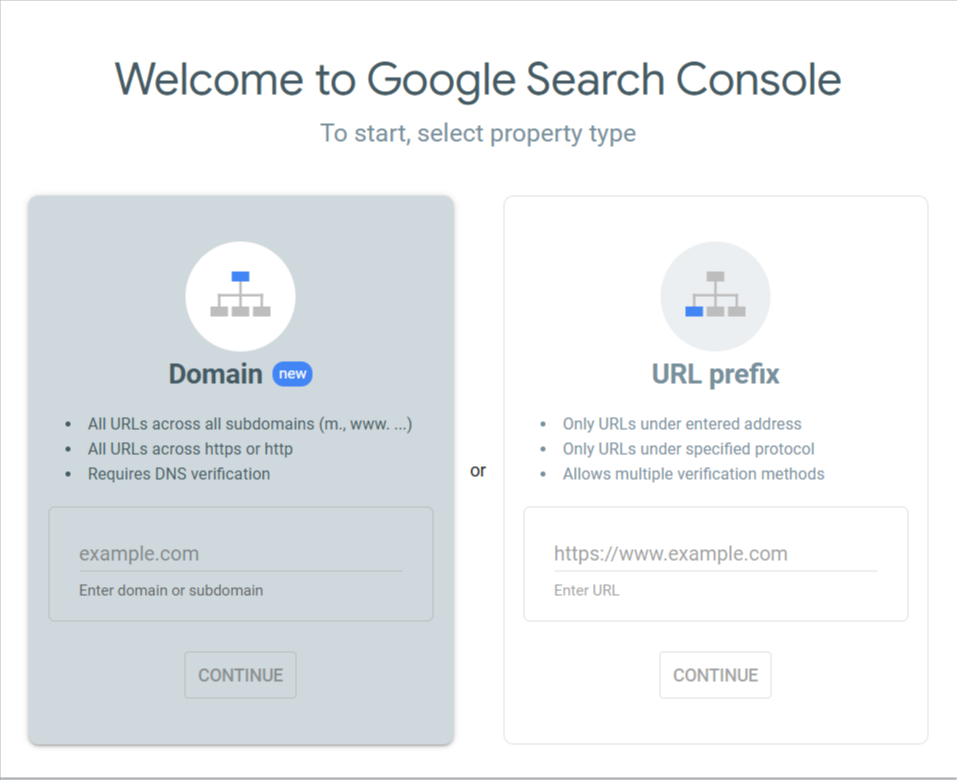
For most complete websites, create a Domain property because it combines protocols and subdomains. Domain properties require DNS verification. Use a URL-prefix property when you intentionally need to isolate one protocol or directory. Google’s Search Console property guide explains the coverage and verification differences.
To set it up:
- Open Google Search Console.
- Add the property and choose Domain or URL prefix.
- Complete the verification method. For a Domain property, add the supplied DNS TXT record through your domain provider.
- Submit the preferred XML sitemap.
- Check that the correct users have suitable permissions and that the account remains accessible when staff or agencies change.
Under Performance in Google Search Console, open the generative AI performance report for Search, choose your date range and review the Pages tab. It shows how often links to each URL appear across AI Overviews and AI Mode combined, giving you a page-level view of which content is gaining AI-search visibility. The current report provides impressions rather than query-level data, so it cannot confirm the keywords behind those appearances.
Use those URLs’ topics and their queries in the standard Search results report to form hypotheses about the searches behind that visibility, rather than treating them as confirmed AI queries. In my opinion, AI-search impressions should be one of the main visibility KPIs we track, alongside clicks, qualified leads and revenue. Compare the same pages and date ranges over time to see whether your visibility is growing.
Set Up Google Analytics 4
Google Analytics 4 helps you understand what visitors do after they reach the website. Google’s GA4 website setup guide covers the current interface and installation options.
Set it up in this order:
- Sign in at Google Analytics and create an Analytics account if the business does not already have a suitable one.
- In Admin, select Create, then Property. Add the property name, reporting time zone and currency. Use settings that match the business’s primary reporting and financial records.
- Under Data collection and modification, open Data streams, select Add stream, then Web. Enter the primary website URL and a clear stream name.
- Review Enhanced Measurement. Keep the useful automatic events enabled and disable anything the team does not intend to collect.
- Install the Google tag through the website’s supported CMS integration, directly after the opening
<head>tag, or through Google Tag Manager. Choose one controlled implementation route so page views are not counted twice. - Visit the website and use Realtime to confirm that the correct stream receives your test session. Test consent states, cross-domain journeys and important templates, not only the homepage.
- Create or identify the events that represent real business outcomes. Then follow Google’s key event instructions to mark only meaningful actions, such as a qualified form submission, booking, subscription or purchase.
- Link the matching Search Console property. In Admin, open Product links, select Search Console Links, choose Link, select the verified property and connect the correct web data stream. Google’s Search Console integration guide shows the full sequence and required permissions.
Track actions that reflect business value, such as form submissions, qualified phone calls, bookings, subscriptions and purchases. Mark only meaningful actions as key events. Scroll depth or time on page can support diagnosis, but neither proves that SEO produced a commercial outcome.
Test every important event from the landing page to the confirmation state. Exclude internal traffic where practical, document referral exclusions and check that consent settings do not silently break measurement.
Set Up Bing Webmaster Tools
Bing Webmaster Tools serves a similar purpose to Search Console. It provides another source of query, crawl, sitemap and indexation data.
Use Bing’s getting started checklist, then complete these steps:
- Sign in at Bing Webmaster Tools with a supported Microsoft, Google or Facebook account.
- Add the site. Importing a verified Google Search Console property is usually the quickest route because Bing can bring across the selected site, sitemap and access details. You can also add the site manually.
- If you add it manually, verify ownership. Bing supports Domain Connect where available, an XML verification file, a meta tag or a DNS CNAME record. Its site verification guide explains each method.
- Open Sitemaps, submit the preferred XML sitemap and check its processing status. Bing’s sitemap guide lists the supported formats and reporting details.
- Inspect the homepage and several important URLs. Confirm that Bing can crawl them, sees the expected canonical and does not report an indexing or robots problem.
- Review Search Performance, URL Inspection, Site Explorer, Backlinks and SEO Reports after data becomes available. Use Site Scan for a second technical view, but verify its warnings before creating work.
- Add the correct users and permissions. Avoid leaving the account dependent on one employee, developer or agency login.
If the site publishes or changes URLs frequently, assess IndexNow after the basic account, sitemap and crawl setup is working. It complements normal discovery. It does not replace crawlable internal links or an accurate sitemap.
The setup is quick, and Bing data can reveal issues or demand that are not obvious in Google-only reporting.
Open AI Performance in Bing Webmaster Tools to see total citations, cited page URLs and grounding queries across Microsoft Copilot, Bing’s AI-generated summaries and supported partner experiences. Grounding queries are grouped phrases associated with content retrieval and citations, rather than the exact prompts people typed. I find this more useful for diagnosing AI visibility than Google’s current impressions-only report because it gives you retrieval context to investigate.
The preview Intents, Topics and Citation Share features add another layer. Intents classify grounding queries by their associated purpose, Topics group related queries into broader themes, and Citation Share shows your site’s citations as a percentage of all citations for the same grounding query. Review queries and cited pages together, then compare periods to identify topic gaps or declining visibility; these are sampled citation signals, not clicks, rankings or Google AI-search data.
Set Up Google Merchant Centre If You Run Ecommerce
Google Merchant Center allows ecommerce businesses to manage product data used across Google shopping experiences. Keep it connected to the website and the platform that owns the product feed.
To establish the account:
- Add the business information and online store URL.
- Verify and claim the website using the ecommerce platform, email, an HTML tag or file, Google Tag Manager or Google Analytics. Google’s Merchant Center verification guide lists the available methods.
- Connect a product data source and resolve feed diagnostics.
- Keep price, availability, shipping, returns and identifiers consistent with the landing page.
- Review product disapprovals after catalogue or template changes.
Merchant Center is not required for every website. Treat it as fundamental for an ecommerce operation that wants visibility in Google’s shopping surfaces.
Set Up Google Tag Manager
Google Tag Manager lets a team manage many tracking tags without changing the site code for every adjustment. It can control analytics, advertising, heatmap and conversion tags through defined triggers.
Use preview mode before publishing a container. Name tags and triggers consistently, record their purpose, remove abandoned tags and restrict publishing permission. A container full of duplicate or unexplained tags creates measurement and performance problems rather than solving them.
Configure SEO Tools For Your CMS
WordPress, Shopify, Magento and other content management systems provide different levels of native SEO control. Confirm what the platform already handles before adding another plugin or app.
The chosen setup should let authorised users manage:
- Titles and meta descriptions.
- Canonical tags and robots directives.
- XML sitemaps.
- Redirects.
- Structured data where the platform does not already create suitable markup.
Use one maintained primary SEO tool where possible. Overlapping plugins can produce conflicting canonicals, duplicate schema or multiple sitemaps. Test the rendered source instead of assuming a plugin setting worked.
Set Up Microsoft Clarity
Microsoft Clarity provides heatmaps, session recordings and behavioural summaries. It can show where people hesitate, repeatedly click, fail to see an important element or abandon a page.
Use Clarity to investigate a defined question, such as why organic visitors abandon a quote form. It is not a substitute for conversion tracking, and a heatmap is not an SEO ranking report. Follow Microsoft’s Clarity setup guide and apply suitable privacy and consent controls.
Clarity now also includes AI Visibility, with Citations and Bot Activity views. Verify the project’s domain, then open the Citations dashboard to review total page citations, grounding queries and cited URLs with their citation counts. The branded and non-branded breakdown helps separate visibility associated with your brand from broader discovery.
Share of authority (SoA) is your citations divided by all domains’ citations in the measured query set, multiplied by 100. Microsoft’s current calculation includes a query on a given day only when your domain was cited for it that day, so do not read SoA as your share of all AI searches. Compare the same reporting scope over time.
The AI referral traffic card shows AI-referred sessions as a percentage of all tracked sessions. Connect Clarity with Google Analytics 4 and use session recordings to investigate what visitors do after arriving. Keep citation visibility, referral sessions and conversions as separate measures.
Bot Activity requires server-side logging through a supported WordPress, server or CDN integration; the browser tracking tag alone is not enough. Use it to see which bots request which URLs, then compare that activity with citations and referral sessions. A bot request alone does not demonstrate that your content appeared in an AI answer.
Set Up Keyword Research And Rank Tracking
Track a representative set of commercial, informational, branded and local queries. Segment by device and location when the search result genuinely changes.
Search Console is the source of truth for the queries that produced Google impressions and clicks. A rank tracker adds repeatable location checks, competitor comparisons, SERP features and alerts. Tools such as Ahrefs, Semrush, AccuRanker and Keyword.com can perform that job.
Pair rankings with landing-page performance. A page can gain positions while attracting worse traffic, or lose one head term while growing across a more valuable query cluster.
Technical SEO Checklist
Technical SEO makes important content discoverable, renderable, indexable and usable. Use this crawling and indexing checklist to review the templates and URLs that support revenue, leads or strategic information.
Create And Submit Your XML Sitemap
An XML sitemap lists the URLs you want search engines to discover. WordPress, Webflow, Shopify and many other platforms generate one automatically. A generated sitemap still needs to be checked.
Include only canonical, indexable URLs that return HTTP 200. Remove redirected, blocked, noindexed and error URLs. Split large sitemaps by content type so faults are easier to isolate.
Common locations include /sitemap.xml and /sitemap_index.xml. Submit the preferred sitemap in Google Search Console and Bing Webmaster Tools. You can also declare it in robots.txt. A sitemap supports discovery, but it does not force indexation.
Configure Robots.txt And Noindex Rules
A robots.txt file tells compliant crawlers which URL paths they may request. A meta robots tag or X-Robots-Tag header can tell a search engine not to index a document.
Review these controls together. Do not block a URL in robots.txt when you need Google to crawl the page and see its noindex directive. Check staging rules, template-level noindex settings and broad wildcard patterns before and after a release.
Search /robots.txt on the live host, validate the syntax and include the correct sitemap location. Do not treat the file as a security control. Blocked URLs can still be exposed elsewhere, and sensitive material requires authentication.
Make Sure You Are Using HTTPS And One Preferred Site Version
Choose one host and protocol, such as https://example.com, and redirect the alternatives directly to it. Test HTTP, HTTPS, www and non-www versions.
Each alternative should resolve to the final preferred URL in one hop. Check for mixed content, expired certificates and internal links that still point to redirected versions.
Identify Crawling And Indexing Errors
A crawl problem prevents or impairs discovery and retrieval. An indexing problem occurs when a URL is known or crawled but is not included in the index as expected.
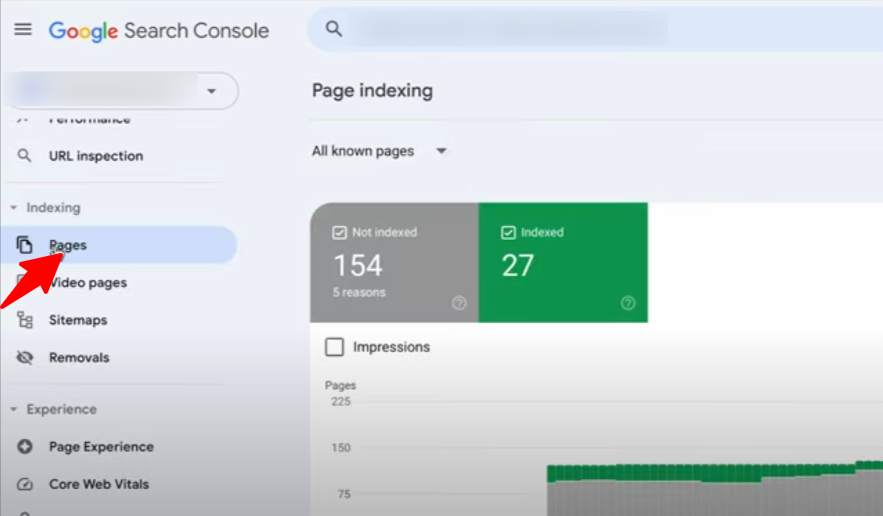
In Search Console, review the Pages report by template and exclusion reason. Inspect representative examples of Crawled, currently not indexed, Discovered, currently not indexed, duplicate URLs, soft 404s and unexpected canonicals.
Compare the crawl, sitemap, Search Console and analytics landing pages. A handful of excluded tag pages may be correct. A high-value service directory missing from the index is not.
Confirm Search Engines Can Render The Main Content
Use Search Console URL Inspection and a rendered crawler to confirm that navigation, product information, copy and internal links appear without user interaction.
Google can process JavaScript, but blocked resources, failed API calls and client-side-only links can still cause discovery or rendering problems. Important links should use normal <a href> elements. Do not require a crawler to click a button to discover the next URL.
Optimise Site Speed And Core Web Vitals
Google’s Core Web Vitals documentation defines three real-world experience metrics:
- Largest Contentful Paint: Aim for no more than 2.5 seconds.
- Interaction to Next Paint: Aim for less than 200 milliseconds.
- Cumulative Layout Shift: Aim for less than 0.1.
Prioritise field data in Search Console and the Chrome User Experience Report. Use PageSpeed Insights and lab tests to diagnose causes, not as the only scorecard.
Check server response, caching, CDN delivery and origin load before micro-optimising every page. Then review image handling, fonts, templates, JavaScript and third-party tags. A single template or script can create the same problem across thousands of URLs.
Find And Fix Broken Links
Broken internal links send users and crawlers to an unavailable or unintended destination. Crawl the site and compare the results with Search Console and analytics to find important 4xx and 5xx URLs.
For each broken link:
- Correct the URL when the destination still exists.
- Update the link to the final URL when it passes through an unnecessary redirect.
- Add a relevant 301 redirect when a retired page has backlinks, traffic or a close replacement.
- Remove the link when no useful destination exists.
- Allow a genuine 404 or 410 when content has been intentionally removed and no substitute exists.
Fix the cause, not just the exported row. Ten thousand broken links may come from one template mistake.
Ensure Mobile Friendliness
Google uses the mobile version of a page for indexing. Confirm that mobile users and crawlers receive the same primary content, structured data, metadata and important links as desktop users.
Use responsive layouts, readable text and usable tap targets. Test menus, filters, forms, cookie controls and intrusive overlays on real devices. Compress appropriately sized images, but do not remove useful content from mobile solely to make the page shorter.
Use Eligible Schema Markup
Structured data helps search engines interpret eligible content and can make a page suitable for supported search features. It does not guarantee a rich result.
Use markup that matches visible content and Google’s current feature documentation. Validate it with the Rich Results Test and monitor enhancement reports in Search Console. Remove unsupported or misleading properties instead of trying to make every page contain every schema type.
Prevent Duplicate Versions And Align Canonicals
Every indexable page should normally have a self-referencing canonical. When two URLs are true duplicates, redirect the retired version if users no longer need it. Use a canonical when both versions must remain accessible.
Canonical tags are signals, not commands. Google also considers redirects, sitemap inclusion, HTTPS and internal linking when selecting a canonical. Intellar’s guide to canonical tags covers the implementation patterns in more detail.
Keep internal links and sitemaps aligned with the preferred URL. Do not point a canonical at one destination while every internal link promotes another.
Make Pagination Crawlable
Give every paginated component page a unique URL and link to the next page with an ordinary <a href>. Use self-referencing canonicals on component pages unless there is a genuine view-all equivalent.
I still keep rel="next" and rel="prev" pagination tags when the implementation is clean. Google’s pagination guidance says it no longer uses them, but other search engines may. Removing a valid machine-readable relationship creates no practical upside.
The tags are supporting signals, not the whole setup. Crawlable links, unique paginated URLs, suitable canonicals and access to items beyond page one do the real work. Intellar’s pagination tags guide covers the setup in more detail.
Control Filters, Sort Orders And Faceted URLs
Decide which filter combinations deserve searchable landing pages and which create crawl bloat. Make valuable combinations indexable only when they have stable demand, unique purpose, suitable content and intentional internal links.
Keep low-value permutations out of the index through deliberate link, canonical, noindex and crawl controls. Do not apply a blanket rule before checking whether a filtered page already earns traffic, links or sales.
Find Orphaned And Deep Pages
Compare crawl data with the XML sitemap, Search Console and analytics. Important URLs found in those sources but absent from a crawl may be orphaned.
Add contextual internal links from relevant pages and reduce unnecessary click depth. Navigation should express priority and relationships, not become a list of every URL on the site.
Identify And Fix Keyword Cannibalisation
Keyword cannibalisation occurs when multiple pages compete for the same search intent and weaken the preferred result. Repeated words alone do not prove it.
Compare page-query performance over time. Confirm whether Google alternates between URLs for the same intent and whether the pages overlap in purpose. Then:
- Consolidate overlapping pages and redirect the weaker URL.
- Retarget pages that genuinely serve different intents.
- Strengthen internal links to the preferred page.
- Retire content that no longer has a distinct job.
A canonical can help with genuine duplicates. It is not a substitute for fixing two unnecessary articles.
Keyword Research Checklist
Keyword research connects customer demand with the pages the business can realistically create and support. Start with the market and customer language before opening a keyword database.
Find Your Seed Keywords
Seed keywords are the core topics that describe what you sell, who you serve and the problems you solve. They are starting points for discovering more specific opportunities.
For Intellar, seed topics include SEO services, technical SEO, keyword research, local SEO, ecommerce SEO and AI search. To find yours, answer:
- What products, services or information do we provide?
- Who is the audience, and what are they trying to accomplish?
- What problems do we solve?
- What language appears in sales calls, support tickets, reviews and on-site search?
- Which topics do genuine search competitors cover?
Use Intellar’s keyword research guide for the full research process.
Discover Your Long-Tail And Zero-Volume Keywords
Long-tail keywords describe a narrower need than a broad seed topic. They may show less reported volume but stronger context and conversion potential.
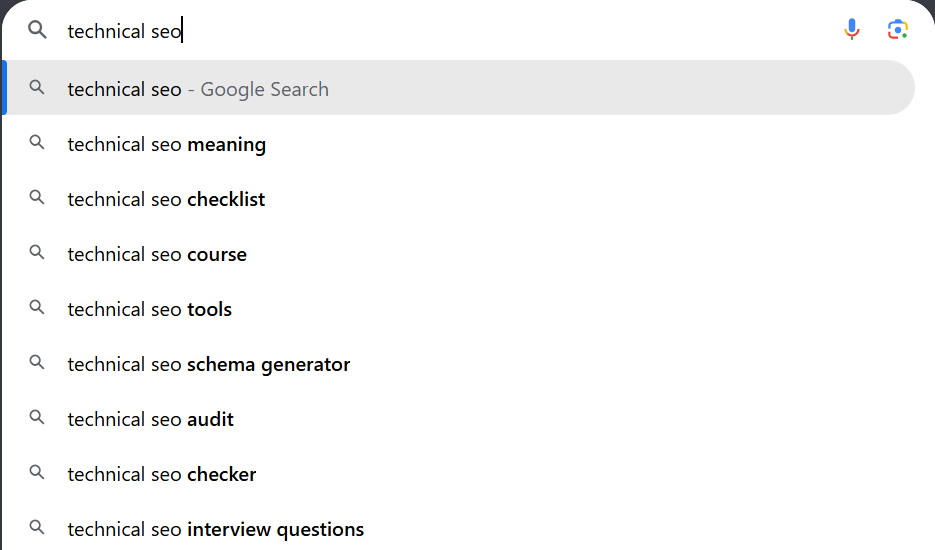
Use Google Autosuggest, People Also Ask, related searches, Search Console, customer conversations, Reddit, forums and tools such as Ahrefs or Semrush. Keep a so-called zero-volume term when it describes a real customer problem, belongs to a larger topic cluster or has clear commercial relevance.
The zero-volume keyword guide explains how to validate these opportunities without treating a database estimate as the final answer.
Find Your Question Keywords
Question keywords reveal the decisions, objections and information gaps behind a topic. Use Search Console, People Also Ask, customer calls, AlsoAsked and community discussions to find them.
Do not create a separate page for every question. Group questions that share intent and answer them inside the strongest relevant page. Split them only when the searcher needs a different format or outcome.
Identify Your Low-Hanging Fruit
Low-hanging opportunities are existing page-query pairs where a focused improvement may produce a gain. Examples include relevant queries ranking between positions 5 and 20, pages with strong impressions but weak click-through rate, and pages that rank for an answer missing from the copy.
In Search Console:
- Review at least three to six months of data and compare with a suitable prior period.
- Filter by page and inspect the queries producing impressions.
- Separate brand from non-brand demand.
- Check the live result before changing the page.
- Improve the answer, snippet, internal links or page experience only when the evidence supports it.
Identify Your Competitors’ Keywords
Compare against sites that rank for the target topic, not only the companies the sales team names. A publisher, marketplace or specialist may be a more useful search competitor than a direct commercial rival.
Review gaps in ranking queries, page types, subtopics, examples, tools, media, sources and internal-link context. The goal is to find an unanswered need and a better execution path. Rewriting the average of page one produces an average page.
Discover Customer-Focused Keywords
Customer-focused keywords describe pain points, use cases and constraints in the customer’s language. They often surface outside traditional research tools.
- Ask customer service and sales teams which questions recur.
- Interview customers from different stages of the buying journey.
- Review on-site search, chat and form data.
- Analyse positive and negative reviews for decision criteria.
- Read relevant forum and community discussions.
Record the evidence behind each idea. A phrase repeated by qualified prospects can be worth more than a large but weakly related search-volume estimate.
Map Each Search Intent To A Preferred Page
Assign every useful keyword cluster to a preferred URL. Closely related terms can share a page when the same content type and answer satisfy them. Separate them when the user needs a different product, service, location or decision.
Maintain a keyword-to-URL map with the preferred URL, primary intent, page type, funnel role and status. Check it before creating content so a new article does not duplicate an existing page’s purpose.
Content Creation Checklist
Good SEO content writing completes the searcher’s task and contributes evidence, experience or clarity that the current results do not.
Understand The Topic’s Search Intent
Search intent is the outcome a person expects from a query. Common categories include:
- Informational: Learn something, such as
what is SEO. - Navigational: Reach a known site or page, such as
YouTube login. - Transactional: Take an action, such as
buy wireless earbuds. - Commercial Investigation: Compare options before acting, such as
best CRM for small business. - Local: Find a nearby provider, product or place.
Google the query and review the result types, page formats and SERP features. Modifiers provide clues, but the live result shows how Google currently interprets the task.
Tailor Your Outline To The Search Intent
Include only the subtopics needed to complete the task. Do not automatically add definitions, benefits, history and a long FAQ to every outline.
Use the result page as evidence, not a template to copy. Competitor coverage can reveal the minimum expected answer. Your outline should also include missing decisions, examples or caveats that improve the result.
Use A Short And Highly Relevant Introduction
Your introduction is not the place to flex your writing muscle. Briefly explain why the reader is in the right place, give the main answer early and establish why the guidance is credible.
A short example, tested result or clear problem statement can work well. Avoid five paragraphs that delay the answer already promised by the title.
Make The Body A Solution Walkthrough
Research the topic like a trained detective and lead the reader from the problem to a usable decision or action. Use short paragraphs and descriptive headings so the page can be scanned without losing the logic.
Strengthen the article with material competitors cannot easily reproduce:
- Interviews and attributed expert insight.
- First-party data or analysis.
- Relevant client or project examples.
- Screenshots from a real process.
- Tested decision rules and edge cases.
- Primary sources that let the reader verify important claims.
Completeness and length are not the same. Google’s SEO Starter Guide does not prescribe a universal word count, so stop when the task is complete.
Improve Content Readability With Useful Visuals
Use images, diagrams, tables or video when they make a process or comparison easier to understand. A screenshot should show the exact control or result discussed in the adjacent copy.
Do not add images simply to break up text. A seven-image walkthrough for a task that can be explained in four bullets creates more maintenance and scrolling than value.
Regularly Update Your Content
Review content when its claims, tools, screenshots, examples or search intent may have changed. Performance is the trigger for some updates, but accuracy and business changes are triggers too.
Choose a refresh, consolidation, redirect, retirement or no-change action based on query coverage, backlinks, conversions, freshness and overlap. Do not delete a page solely because it has low traffic. It may still support customers, earn links or serve a necessary niche.
The maintenance cadence later in this checklist turns that review into a repeatable process.
On-Page SEO Checklist
On-page SEO clarifies each page’s purpose, supports usability and connects it to the rest of the site.
Include Your Primary Topic In A Stable URL
Use a short, readable URL that reflects the page’s purpose. A sound default is lowercase words separated with hyphens. Avoid dates unless the content is inherently time-bound.
Check that every indexable page has:
- One preferred HTTPS URL.
- A stable path that can survive a content refresh.
- No unnecessary IDs, session values or tracking parameters.
- A self-referencing canonical where appropriate.
- Internal links that use the preferred version.
Do not change an established URL solely to make it prettier. When a change creates genuine value, add a one-hop 301 redirect, update internal links and sitemaps, and monitor the migration. This article is moving from a dated slug to /blog/seo-checklist/ because the page is intended to remain evergreen.
Read Intellar’s URL best practices before changing a live structure.
Use The Primary Topic In The Title And Meta Description
Write a concise title that identifies the page’s specific purpose. Use the primary topic naturally, preferably where a searcher can recognise it quickly.
Write a meta description that sets an accurate expectation and gives the right person a reason to click. Google may generate a title link or snippet from other page content, so treat metadata as a strong input rather than guaranteed output.
Cover Related Terms, Entities And Subtopics
Use the language needed to explain the topic accurately. Related terms, named entities, examples and subtopics help a page cover the real subject without repeating one exact keyword.
Do not use “LSI keywords” as an SEO method. It is an outdated label that does not describe a practical way to optimise a modern page. Derive supporting language from the topic, customer vocabulary, Search Console and live result analysis instead.
Use One Clear H1 And Descriptive Subheadings
The H1 should identify the page’s subject. Use H2 and H3 headings to express the information hierarchy and make each section easy to scan.
Include a target phrase when it fits naturally, but do not force the same keyword into every heading. A precise heading is more useful than a repetitive one.
Optimise Your Images
Use original or genuinely useful images close to the copy they support. Write concise alt text that communicates the image’s purpose when it is informative. Use empty alt text for purely decorative images.
Serve appropriate dimensions and modern formats, reserve layout space and compress files without making them illegible.
Use Internal Links
Link to the next useful internal page with descriptive anchor text. Important pages should receive links from related content, not only from navigation or the footer.
There is no universal ideal number of internal links. Add links that support the task, clarify a relationship or promote a strategically important page. Update old links to the final preferred URL instead of relying on redirect chains.
The internal linking guide explains how internal links help people and crawlers find important content.
Use External Links
Link to authoritative external sources when they let readers verify a claim or continue a technical task. Official documentation, original research and primary data are usually stronger references than another summary.
Competitor status alone is not a reason to withhold a useful source. Judge the link by whether it improves accuracy and helps the reader.
Off-Page SEO Checklist
Off-page SEO builds recognition and authority beyond the website. Focus on relevant editorial exposure and relationships rather than raw link counts.
Build Quality Backlinks
Backlinks can help search engines discover pages and understand which resources other sites consider worth referencing. The challenge is earning relevant links that make sense to an editor and their audience.
Practical approaches include:
- Create link-worthy assets. Original data, statistics, calculators, templates, surveys, visual resources and definitive guides give publishers a specific reason to cite you.
- Guest post on relevant sites. Pitch a topic that fills a genuine gap in the publication. Provide original examples and write for its readers. Avoid forced anchors, recycled articles and sites created mainly to sell placements. A good guest post remains useful even if the link is removed.
- Review competitor link profiles. Find relevant sites that cite comparable resources, then offer a stronger asset or expert contribution where it fits.
- Contribute expert insight. Respond to credible journalist and publisher requests when your experience directly supports the story.
- Reclaim unlinked mentions. Ask for a link when an existing mention would genuinely help the reader identify the source or business.
- Build publisher relationships. Useful, repeatable contributions tend to create more opportunities than one-off mass outreach.
- Use broken-link outreach selectively. Point out a relevant dead resource and suggest a close replacement, without pretending every broken link deserves your page.
Intellar’s link building service focuses on relevance, editorial value and commercial fit.
Reclaim Lost And Misrouted Authority
Review valuable lost links, links pointing to retired URLs and inbound links passing through unnecessary redirect chains. Restore the original resource or request a correction when the referring page remains relevant.
Do not chase every lost directory link. Prioritise references that send qualified visitors, support a valuable page or come from a source trusted by the market.
Leverage Social Media
Social distribution can expose content to journalists, customers, creators and communities who may cite, share or search for the brand. It can also extend the life of original research and useful examples.
Social signals are not a direct Google ranking factor, and a social profile does not automatically prove E-E-A-T. Use social channels for audience development, discovery, branded demand and relationships.
Repurpose an article into channel-native formats, such as a concise LinkedIn analysis, an X thread, a short video or a visual summary. Link back only when the destination gives the audience the useful next step.
AI SEO Checklist
AI Overviews, AI Mode and independent answer engines can surface websites as supporting sources. The foundations remain familiar: a page needs to be accessible, indexable, useful and supported by evidence.
Optimise For AI Overviews And LLMs
Google’s guidance for AI features and websites says there are no additional technical requirements or special optimisations for AI Overviews and AI Mode beyond the relevant Search fundamentals. A page must be indexed and eligible to appear with a snippet. Read our generative engine optimisation guide for the wider process.
Improve the page’s usefulness across search and AI experiences:
- Answer the main question early.
- Cover the task with clear headings and short, precise passages.
- Add original analysis, examples or experience instead of commodity summaries.
- Keep important facts in crawlable HTML.
- Use high-quality images or video where the query is visual.
- Keep Merchant Center and Business Profile information accurate where relevant.
- Review preview controls such as
nosnippet,data-nosnippet,max-snippetandnoindexbefore restricting how content may appear.
Use Intellar’s AI SEO services for a wider visibility and citation framework. Our automotive AI search study shows examples of the model, pricing and comparison details we checked in Google’s answers.
Make Important Claims Easy To Cite
Use direct definitions, named entities, source links, dates and clear units. Place the evidence near the claim and distinguish an observed result from an opinion or forecast. Our automotive SEO statistics show how to keep a finding’s market, date and source beside the claim.
Create passages that stand on their own without stripping away necessary conditions. A concise answer is useful. An overconfident answer that omits the conditions is not.
Track which pages and third-party sources are cited across the search and answer platforms your audience uses. Use the pattern to find missing evidence and coverage, not to manufacture formulaic copy.
Use AI Tools For SEO Tasks With Editorial Control
AI can help structure research, analyse data, find inconsistencies, repurpose original material and accelerate repetitive production tasks. It can also invent facts, flatten brand voice and repeat an error across many pages.
Keep a named editor responsible for the result. Verify claims and links, protect confidential data, review training and retention settings, and add experience or evidence the model could not invent.
Google’s guidance on generative AI content focuses on accuracy, quality and relevance. Producing many pages without added value can breach its scaled content abuse policy.
Local SEO Checklist
Local SEO helps an eligible business appear when people search for a nearby product, service or location. The work starts with accurate business information, then extends to the profiles, reviews, citations and location pages customers use to make a decision.
Use this section to establish the basics before expanding a broader local SEO campaign. A business with several locations should repeat the checks for every eligible location and keep a clear owner for each profile.
Set Up Google Business Profile
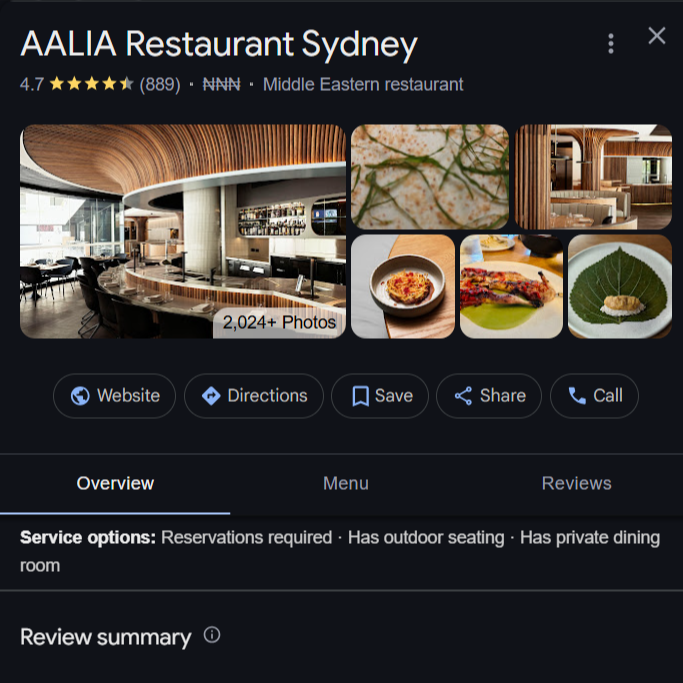
Google Business Profile is the foundation of most local SEO campaigns because it can make an eligible business visible across Google Search and Maps. Before creating anything new, search Google Maps for the business and each location. Duplicating an existing profile can split reviews and create avoidable verification problems.
Follow these steps:
- Use Google’s add or claim a Business Profile guide to claim an existing listing or create one for an eligible business.
- Enter the business name exactly as it appears in the real world. Do not add keywords, locations or services that are not part of the actual name.
- Choose the most specific primary category that represents the core business, then add accurate secondary categories where they help describe other important services.
- Add the correct address or service area, primary phone number, regular hours, special hours and website destination. Give each location the most relevant local landing page rather than sending every listing to the homepage.
- Complete the description, services or products, attributes, photos and videos that genuinely apply. Use recent media that helps someone understand the location, team or service.
- Complete the verification method Google offers. If Google requests a live video call, use Intellar’s Google Business Profile live video verification guide to prepare the evidence before the call.
- Review owners and managers. The business should retain primary ownership and should not depend on the account of a former employee, agency or supplier.
- Test the live profile in Search and Maps. Check that calls, directions, opening hours and the website button work as intended.
Revisit the profile whenever the business changes its hours, services, contact details or location. Add temporary or holiday hours before customers need them, not after incorrect information causes a complaint.
Set Up Bing Places For Business
Bing Places for Business is Microsoft’s local listing platform. It gives the business another maintained entity source and can help it appear across Bing’s local experiences.
Set it up as follows:
- Open Bing Places for Business, sign in and search for the business before adding a new listing.
- Claim the existing listing or create the correct business and location record.
- Where the import flow is available and the Google Business Profile is accurate, import its information instead of rebuilding the listing manually.
- Review the imported name, category, address or service area, phone number, hours, website URL, description and photos. Do not assume every field or category transferred correctly.
- Complete Microsoft’s requested verification and check the published listing after approval.
Record who owns the Bing account and review the listing when material business information changes.
Build Relevant Local Citations
Local citations are mentions of a business’s name, address and phone number on third-party websites and platforms. They help people find and verify a business, but their value depends on accuracy, relevance and the quality of the source.
Build and maintain citations in three groups:
- Core platforms: Claim profiles on services customers use to search, navigate or contact businesses, including Apple Business Connect and the main search platforms.
- Authoritative local sources: Use reputable country, city and regional directories, chambers of commerce and recognised business organisations where the listing is legitimate. Whitespark maintains a useful list of local citation sources by country.
- Relevant industry sources: Claim accurate profiles on respected trade associations, professional directories, marketplaces and review platforms for the sector. BrightLocal’s industry citation lists can provide a starting point, but each source still needs to be assessed.
Before creating a citation, search for the business name, address and phone number to find existing and duplicate records. Claim the strongest existing profile where possible, correct inaccurate information and request duplicate suppression or merging through the platform’s supported process.
Do not pay for hundreds of low-quality directory submissions simply to increase the citation count. A smaller set of authoritative, relevant and maintained profiles is more useful than a large set that nobody trusts or manages.
Manage Your Online Reviews
Reviews influence how prospective customers assess a business and can reveal where the service experience needs attention. Build review requests into a real customer journey instead of running occasional campaigns that produce unnatural spikes.
Use this process:
- Create the official Google review link or QR code for the verified profile.
- Add it to appropriate touchpoints such as a post-service email, receipt, thank-you message or support close-out.
- Ask for an honest review after a genuine interaction. Do not offer incentives, selectively request only positive reviews or pressure customers to use particular language.
- Monitor the platforms that matter to the audience and respond promptly. Thank positive reviewers and address negative feedback calmly without exposing personal information.
- Report reviews only when they breach the platform’s policy. A critical review is not automatically a policy violation.
- Review recurring themes with the people responsible for sales, service and operations.
The language in genuine reviews can also show how customers describe a service, problem or outcome. Use those insights to improve operations, landing pages and customer support, but do not copy customer claims into marketing without checking they are accurate and supportable.
Add And Maintain Consistent NAP Information
NAP means name, address and phone number. Keep those core details accurate and recognisably consistent across the website, Google Business Profile, Bing Places, Apple Business Connect and priority citations.
Audit the following places:
- The website header, footer, contact page and location pages.
- Business profiles, map platforms and navigation services.
- Social profiles and important review platforms.
- Industry directories, local directories and membership listings.
- Structured data and any feeds that distribute location information.
Minor formatting differences such as Street and St are less important than giving customers conflicting business details. Use the business’s correct real-world name, one authoritative primary phone number per location and the current address or service area. Do not insert keywords into the business name to create artificial consistency.
When details change, update the owned website and primary business profiles first, then work through the highest-value citations. Maintain a register containing the profile URL, owner, login route, business details and last review date.
Add Local Business Schema Markup
LocalBusiness structured data helps search engines interpret the business details shown on a location page. It does not create a Business Profile or guarantee a rich result, but it gives machines a clearer description of the entity.
Implement it in this order:
- Read Google’s current LocalBusiness structured data documentation and choose the most specific suitable
LocalBusinesssubtype. - Add the markup to the relevant location page, preferably as maintainable JSON-LD. Use one clearly defined location entity for each dedicated location page.
- Include applicable visible details such as
name,address,telephone,url,openingHoursSpecification,image,geoand the canonical page identifier. Do not mark up information that users cannot verify on the page. - If you use Google’s Structured Data Markup Helper to produce starting markup, have a developer review the output and adapt it to the site’s current data model.
- Validate the result with the Rich Results Test and inspect the rendered page to confirm the markup is present, accurate and parseable.
- Recheck the markup after template releases and whenever a location’s contact details or hours change.
Keep the schema, page copy, citations and business profiles aligned. Structured data cannot correct an ineligible, incomplete or poorly maintained profile.
Finally, monitor the phrases and features that trigger local results. Intellar’s guide to Google Business Profile justifications explains the snippets Google may surface to connect a business with a particular search.
SEO Maintenance Cadence
The checklist becomes useful when it has a review rhythm. Adjust the frequency to the site’s size, release pace and commercial risk.
Weekly
- Check site availability and critical templates.
- Test primary conversion events and forms.
- Review material changes in clicks, impressions, revenue and leads.
- Investigate new 4xx or 5xx errors on important paths.
- Review significant publishing and deployment changes.
Monthly
- Analyse page-query movement in Search Console.
- Review sitemap and index coverage by template.
- Compare rankings by intent cluster and landing page.
- Find internal-link opportunities for new and improving pages.
- Review Merchant Center diagnostics where applicable.
- Check priority local profiles, reviews and listing changes.
- Review AI visibility and citation patterns where they affect the audience.
Quarterly
- Re-crawl the site and compare template-level changes.
- Review Core Web Vitals with field data.
- Refresh, consolidate or retire content using performance and overlap evidence.
- Reassess competitor content, link gaps and search-result formats.
- Confirm tracking definitions still match business outcomes.
- Reprioritise the roadmap by impact, effort and dependency.
What To Fix First
When the audit produces more work than the team can ship, use this order:
- Measurement failures that prevent you judging results.
- Crawl, render and indexation blockers on valuable pages.
- Incorrect page targeting or search intent.
- Weak commercial pages and internal-link gaps.
- Content refreshes with existing impressions, links or conversions.
- Site-wide performance and template faults.
- New content and authority campaigns.
- Low-impact warnings with no verified consequence.
The checklist should produce a roadmap, not a larger checklist. Every accepted action needs an owner, expected outcome, evidence and review date.
Final Thoughts
SEO changes constantly, but the operating sequence is stable. Measure the right outcome, make important pages accessible, map demand to the right URL, create a result worth finding and maintain the system.
You do not need to complete every item at once. Start with the blocker that affects the most valuable pages, then work down the dependency chain.
If you need help turning these findings into a prioritised plan, start an SEO strategy conversation with Intellar.